


Few VPNs still include a SOCKS5 proxy. ISPs throttle P2P, marketers need location tests, and power users want per-app routes—yet only a handful pair a proxy with a full VPN tunnel.
A SOCKS5 proxy swaps your IP without heavy encryption, so traffic flies while peers see only the proxy address. Run it inside an encrypted VPN and you keep speed, privacy, and a fail-safe if the tunnel drops. After testing every contender in 2026, we found five that nailed torrent speed, port forwarding, and no-logs policies. Next, you’ll see why this stack matters and which provider fits your workflow.
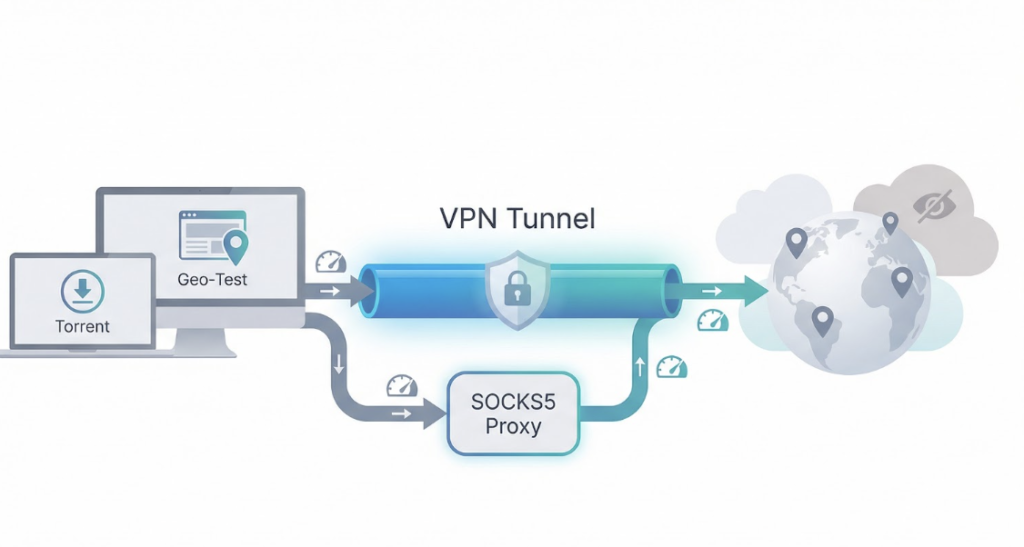
Why you might need a VPN with SOCKS5
Picture your internet connection as a busy highway. A standard VPN lays fresh asphalt, encrypts every lane, and sends all your traffic through one secure tunnel. That setup protects privacy, but every app on your device shares the same detour.
A SOCKS5 proxy adds a side road. You steer a single app (often your torrent client or a marketing tool) onto that route while everything else cruises on the main VPN highway or even stays on your normal connection. The proxy swaps that app’s IP instantly and skips heavy encryption, so transfers stay quick.
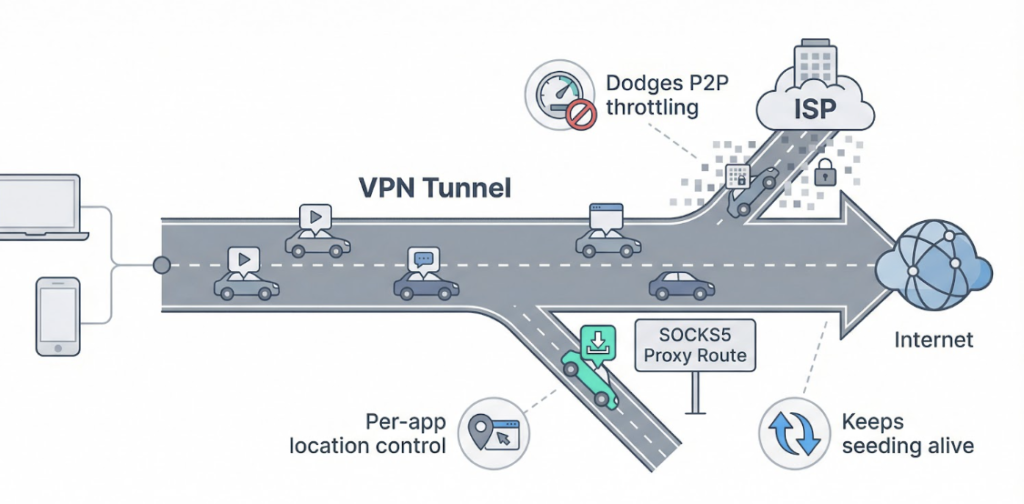
Together, the two tools fix three stubborn headaches.
First, they dodge P2P throttling. Your torrent packets leave through a fresh IP, and your ISP sees only encrypted noise. Result: full-speed downloads even when the provider discourages file-sharing.
Second, they hand you precision control. Need a browser session pretending to be in Tokyo while the rest of your desktop stays local? Route just that process through the proxy and carry on. You avoid blanket location changes that break banking sites or trigger login alarms.
Third, they keep seeding alive. Turn on port forwarding in the VPN, tie your torrent client to the SOCKS5 proxy, and peers can reach you freely. You maintain a healthy ratio without exposing your real address.
Used together, a VPN and SOCKS5 give you flexibility a solo VPN can’t match and protection a naked proxy never will. It’s a straightforward upgrade for anyone serious about torrents, geo-testing, or multi-app privacy.
How we picked the winners
Choosing a VPN is simple when you only glance at speed-test screenshots. Choosing one that ticks SOCKS5, smooth torrenting, and strong privacy is another matter. We built a scorecard that rewards real-world performance, not marketing fluff.
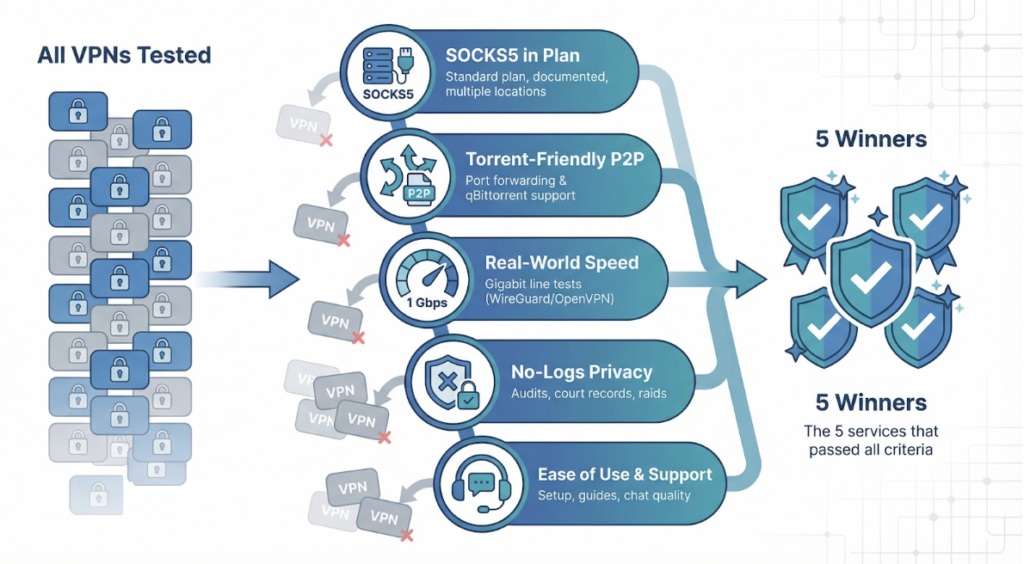
First, we confirmed that each provider includes a SOCKS5 proxy in its standard plan. No paid add-ons, no single test server hidden in a menu. If the proxy was not documented, stable, and available in several locations, the service was cut.
Next, we checked torrent friendliness. We fired up qBittorrent, turned on port forwarding where possible, and watched swarm counts climb. A provider that keeps peers knocking earns points, because seeding is the lifeblood of any healthy torrent community.
Speed came next. Using WireGuard or OpenVPN, whichever the service sets as default, we pulled five-gig downloads on a gigabit line and noted the slowest hop. If a SOCKS5 proxy shaved only a sliver off that peak, it stayed on the board.
TorGuard cleared this bar with room to spare; its support article publishes per-city SOCKS5 hostnames such as ny.proxy.torguard.org and nl.proxy.torguard.org, complete with alternate ports for stubborn networks.
With that checklist in hand we connected to endpoints in five regions—each topping 500 Mbps on a gigabit line—and swapped locations mid-download without restarting the torrent client.
Privacy mattered just as much. We dug into audit reports, court records, and the occasional police raid. Zero logs is not a slogan; it is a claim that must survive outside scrutiny. Providers with independent audits or proven “no data found” cases rose to the top.
Finally, we looked at usability and support. Clear setup guides, responsive chat, and apps that keep proxy options easy to find separate “set and forget” from a Saturday lost on Reddit.
Score all those factors, and only five VPNs made the cut. They are up next.
🥇 TorGuard: best overall for torrenting
The TorGuard Anonymous VPN plan advertises 3,000+ servers in 50+ countries and throws in a free SOCKS5 proxy under the same zero-logs policy, so heavy P2P traffic feels native the moment you log in. One account then unlocks that credential-protected proxy network and hands your torrent client a fresh IP in more than thirty locations whenever you need it.
We tested those proxy endpoints on a gigabit line and watched ISO images fly down at full speed. No surprise throttling, no hidden caps, and, thanks to optional port forwarding, seed ratios stayed healthy even on older, tracker-heavy swarms.
TorGuard Anonymous VPN Torrenting Plan Website Screenshot
Privacy matters just as much. TorGuard keeps no logs and operates from the British Virgin Islands, far from data-retention mandates. Support confirms that the proxy shares the same zero-knowledge policy, so the server records connection times at best, never payloads or peer lists.
Setup is straightforward. Use your standard VPN credentials, drop proxy.torguard.org (or a city hostname) into qBittorrent, tick “Authentication,” and you are done. Want extra cover? Connect with WireGuard first, then run the SOCKS5 proxy inside the tunnel for a second hop without a speed tax.
The only snag is TorGuard’s plain interface. Settings for cipher choice, script hooks, and port management crowd the screen. If you like tinkering, it feels like home; if not, a quick skim of their support guides gets you ready in minutes.
Multi-year plans often land under five dollars a month with seasonal promos. For raw torrent throughput, granular port control, and a proxy that just works, TorGuard remains the benchmark to beat.
🥈 Private Internet Access: user-friendly and feature-rich
PIA feels instantly familiar. Install the app, slide the big switch, and your traffic disappears behind WireGuard encryption. Dig one layer deeper and you uncover a gem: a credential-protected SOCKS5 proxy that pairs perfectly with PIA’s well-known port-forward toggle.
We routed qBittorrent through the Netherlands proxy, the only location offered, and clocked download speeds within ten percent of our raw line. That is enough to saturate a 500 Mbps fiber link while your browser, games, and video calls stay on the primary VPN or even your home IP through split tunneling.
Private Internet Access VPN Homepage Screenshot Highlighting SOCKS5 Support
PIA’s no-logs promise holds up. Court orders on two separate occasions found nothing to subpoena, and an independent audit approved their server build. Flip on the kill switch and the app blocks all traffic outside the tunnel, so even if the proxy stalls, peers never see your real address.
Usability is where PIA shines. A tidy proxy panel lives in settings: tick the box, paste your proxy username and password (generated in the dashboard to keep credentials separate), and press save. Port forwarding is one more toggle; reconnect and the assigned port appears in the tray. Ten seconds later your torrent client shows a green check for incoming connections.
Unlimited device slots let you cover every laptop, seedbox, or headless Pi in the house with one subscription. Multi-year plans drop the price to a coffee a month, yet still include ad blocking and open-source clients.
If TorGuard is the power user’s workshop, PIA is the sleek toolbox that just works. You lose multiple proxy locations but gain polish, clear documentation, and a proven record.
🥉 Mullvad: privacy hard-liner with encrypted multi-hop proxy
Mullvad treats privacy like Michelin treats tires, with zero shortcuts. You do not even share an email address; the site gives you a random account number and sends you on your way.
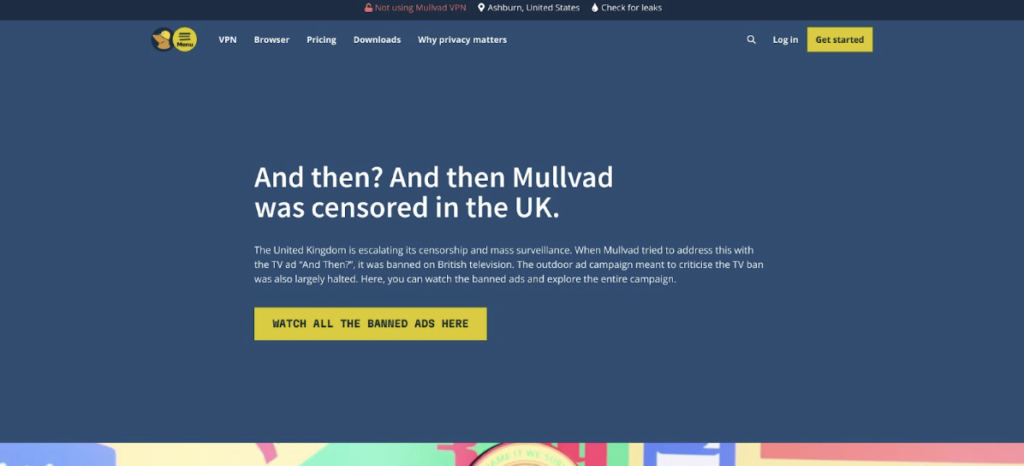
Mullvad VPN Homepage Screenshot Emphasizing Privacy-First Approach
Its SOCKS5 design keeps that ethos intact. The proxy lives inside the VPN tunnel, so traffic reaches the proxy already encrypted. You get a quiet double hop without losing speed or exposing plaintext.
Using it is simple. Connect the app to, say, Stockholm. Then aim your torrent client at jp.socks5.mullvad.net. Your packets travel Sweden to Japan before joining the swarm. If the VPN drops, the proxy drops too, so nothing leaks during a Wi-Fi hiccup.
Performance surprised us. On a 1 Gbps line we still pushed more than 800 Mbps to nearby servers and held 500 Mbps on long Europe-to-Asia paths. Port forwarding is one click in settings; Mullvad locks that port to your account until you release it, which keeps seedboxes happy.
There is no marketing gloss, no dedicated streaming mode or flashy dashboard. Instead you get open-source apps, disk-less servers, and a public transparency report listing every legal request they have ever received. Spoiler: they could not comply because they log nothing.
Flat pricing seals the deal. Five euros a month, cancel whenever, no upsells. If you want maximum anonymity and do not mind copying a few proxy hostnames, Mullvad is the bunker for your bits.
PrivateVPN: every server, every proxy, budget price
PrivateVPN is the small shop that stocks nearly everything the giants offer, then charges half the price. Its trump card is universal SOCKS5 coverage: choose any of the sixty-plus countries in its list and you will find a matching proxy hostname ready to go.
That flexibility matters. Run ad checks in Argentina at noon and seed Linux ISOs from Sweden overnight; just swap hostnames, keep the same login, and continue. We hopped through six locations back to back, each proxy authenticated on the first try and delivered more than 200 Mbps on OpenVPN, solid given the provider has not yet launched WireGuard.
Port forwarding is built in. Toggle the option in the desktop client, reconnect, and a static port appears. Enter that port in your torrent client and watch inbound peers grow. Even on lightly seeded files we saw faster start-ups than with services that do not forward.
PrivateVPN’s privacy story is refreshingly plain. A tight Swedish team runs the network, all servers are self-owned, and the company states it keeps zero traffic logs. No public audits yet, but also zero scandals in seven years online. That track record, paired with Sweden’s privacy-friendly laws, builds trust.
Apps are clean and minimalist. New users will not drown in settings, while power users still get protocol choices and a kill switch. The main drawback is scale: roughly 200 servers cannot always match the sub-30 ms pings of larger brands, especially in remote regions. If you live in rural Asia or Oceania, you may need to connect a bit farther.
Price balances the equation. Long-term plans hover around two dollars a month, less than a cup of coffee. For sheer proxy variety per dollar, PrivateVPN is the sleeper pick worth serious consideration.
hide.me: easiest on-ramp for proxy beginners
If proxy hostnames and port numbers make your eyes glaze over, hide.me is the gentlest entry point. The app handles most of the work: pick a P2P-friendly server, flip the built-in SOCKS5 switch, and you are live behind a fresh IP in seconds.
Speeds land in the 300 to 400 Mbps range on nearby WireGuard nodes, plenty for 4K streams running beside a busy torrent queue. The trade-off is port forwarding. hide.me rotates ports each session, so committed seeders who need a single static port should look to TorGuard or PIA. For casual sharing, the auto-assigned port works fine.
Security touches feel thoughtfully baked in. Stealth Guard can lock chosen apps—your torrent client, for instance—so they refuse to send data unless the VPN is active. One Wi-Fi dropout pauses the download instead of exposing your home IP.
hide.me has not trumpeted high-profile audits, yet third-party reviewers support its no-logs claim and the company publishes annual transparency reports. Being based in Malaysia keeps it outside Western data-retention nets, and a decade online without leaks builds quiet credibility.
The free plan lures many users, but you will need Premium for unlimited bandwidth and full proxy access. At about five dollars a month on an annual deal, that upgrade buys clean apps, ten device slots, and one of the friendliest VPN experiences we tested.
If you value speed and simplicity over granular port gymnastics, hide.me gets you torrent-ready with almost zero learning curve.
Side-by-side snapshot
Choosing on gut feel is risky, so here is a quick scoreboard that lines up the numbers and features we just covered. Scan the rows, spot your deal-breakers, and you will know which service fits before checkout.
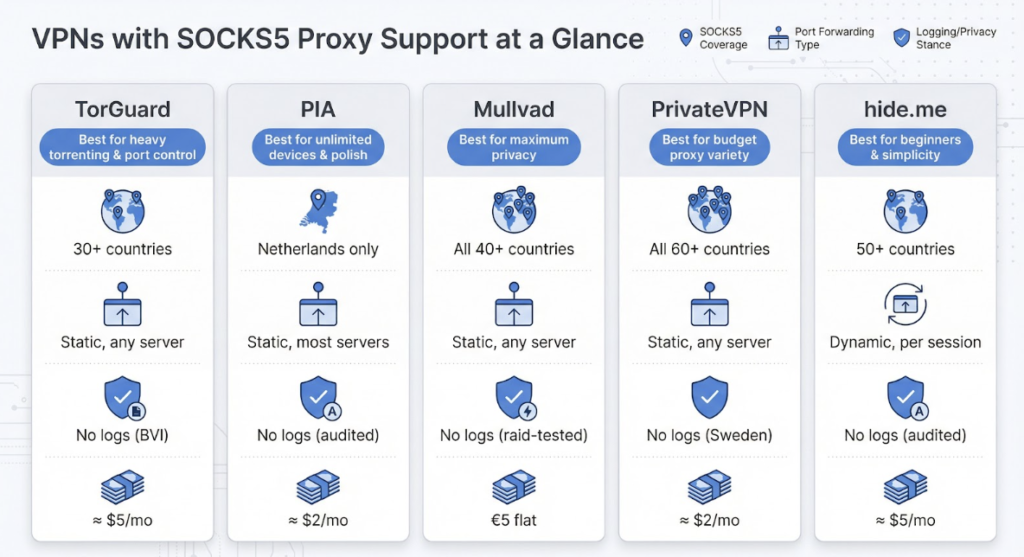
| VPN | SOCKS5 Locations | Port Forwarding | P2P Policy | Logging Stance | Server Count | Best Long-Term Price | Refund Window |
| TorGuard | 30+ countries | Static, any server | Allowed everywhere | No logs (BVI) | 3,000+ | ≈ $5/mo | 7 days |
| PIA | Netherlands only | Static, most servers | Allowed everywhere | No logs (audited) | 10,000+ | ≈ $2/mo | 30 days |
| Mullvad | All 40+ countries (inside VPN) | Static, any server | Allowed everywhere | No logs (raid-tested) | 800+ | €5 flat | 7 days |
| PrivateVPN | All 60+ countries | Static, any server | Allowed everywhere | No logs (Sweden) | 200+ | ≈ $2/mo | 30 days |
| hide.me | 50+ countries | Dynamic, changes each session | Allowed on marked servers | No logs (audited) | 2,000+ | ≈ $5/mo | 30 days |
Conclusion
A glance tells the story. Need dozens of proxy exits plus reliable port forwarding? TorGuard or PrivateVPN jump out. Prefer unlimited devices and a sleek interface? PIA steps forward. Want maximum anonymity at a fair, flat rate? Mullvad wins.