


Nora carries a cobalt envelope from a rainy bus shelter to a lighthouse. Along the way, daylight, wind, and changing camera angles reveal different sides of the same character. I used an AI video generator to build the four-scene journey around recognizable hair, clothing, and one missing coat button. Those details keep Nora familiar across locations and make the small object inside the envelope matter at the end.
Recognize Nora in Each New Location
The character remains readable across the full sequence. Her face changes subtly with angle and expression—as a real face should—but the combination of her silver temple streak, mustard scarf, navy coat, wide-leg trousers, and grounded body language survives the transitions. More importantly, those details are not decorative. One absent amber button becomes the ending.
That distinction matters. Consistency is not the absence of all visual change. It is the preservation of the right identity signals while pose, light, distance, weather, and emotion are allowed to change.
Begin with a Clear Character Reference
Begin with a clear character reference before planning profile turns, full-body motion, weather, and changing light. The audience needs enough recognizable details to follow the same person through the journey.
Nora is a fictional traveler with recognition cues spread across her hair, coat, scarf, and silhouette. Those details remain important in the rain, daylight, sunset, and lamplight.
Define Recognizable Character Details Before Generating
An AI character image generator can provide an appealing portrait, but a portrait alone is weak production material. A useful screen character needs signals that survive beyond a close-up. I assigned Nora four kinds of recognition before writing motion:
| Recognition layer | Nora’s anchor | Why it survives a scene change |
| Face | Narrow silver streak above the right temple | Visible in front, profile, and moving hair |
| Color relationship | Mustard scarf against a navy coat | Readable at phone size and under cool or warm light |
| Silhouette | Long pea coat over wide-leg trousers | Recognizable even when facial detail is small |
| Story absence | One missing lower-left amber button | Creates negative space that the final scene can repay |
The missing button connects character design to the ending. Keep that space visible on the coat until Nora discovers the loose button inside the envelope.
Watch Nora Travel from the Bus Stop to the Lighthouse
1. Rain Makes the First Introduction
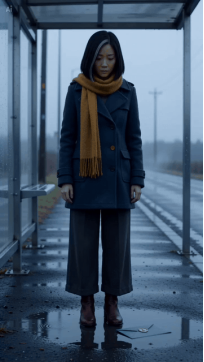
The opening holds on a full-body view long enough to register Nora’s proportions and clothing. A cobalt envelope slides through a shallow puddle, touches her boot, and prompts a natural bend-and-pick-up action.
The steady camera lets the envelope and wardrobe register before Nora bends down. Her planted feet and the single blue envelope make the pickup easy to follow.
2. Daylight Reveals Nora’s Familiar Features

At the terminal, Nora advances through a steel turnstile as a draft carries the envelope away. The rail and glass briefly obscure part of her body before she reappears and retrieves it.
The partial obstruction shifts attention to details that remain visible: the hair, mustard scarf, coat length, and gait. Together they connect the traveler before and after she passes the rail.
3. Follow Nora on the Windy Ferry Deck
On the ferry, the camera sees more profile than front view. Wind moves both the scarf and hair, sunset warms the skin, and the ocean creates a high-detail background. Nora turns toward a distant lighthouse, then back toward the lens while the brass seal catches the light.
The profile view keeps the silver streak and scarf readable while the railing gives the body a stable sense of scale. Nora’s turn also establishes the lighthouse as her destination.
4. The Wardrobe Detail Becomes the Twist
Inside the lantern room, Nora breaks the seal and tips one amber button into her palm. She studies it as the previously dark lamp glows behind her. The object is legible because the shot begins close enough to read both hands and expression.
The twist is deliberately small. It does not require a creature, a second character, or a location reset. The recovered button retrospectively explains why the coat’s asymmetry mattered, while the waking lamp gives the vertical frame a strong final image.
Give Every Character Detail a Story Function
The most dependable continuity choices in this story do two jobs at once:
· The silver streak identifies Nora and makes a profile turn recognizable.
· The scarf creates a color anchor and visualizes wind.
· The envelope connects locations and supplies a reason to keep moving.
· The missing button checks wardrobe continuity and sets up the reveal.
· The lighthouse is first a distant destination and later the source of the closing light.
This is a better use of prompt space than stacking ten arbitrary facial measurements. Viewers remember relationships: warm scarf against dark coat, sealed blue shape against wet gray ground, missing button answered by a loose button. Those relationships can remain stable even when expression and camera angle change.
Carry Character Details into Every New Prompt
For every clip, I separated the instruction into three parts.
Carry forward: the character’s face, side-specific silver streak, clothing palette, missing button, and the one-envelope rule.
Apply pressure: one new difficulty, such as bending, turnstile occlusion, a profile turn in wind, or a close hand action.
Leave an exit frame: end with the envelope in hand, the lighthouse recognized, or the button revealed. That exit gives the next scene a clear narrative starting condition.
Give each prompt one clear movement and one new story fact. The ending of that movement sets up the next scene while the reference details preserve Nora’s identity.
Follow the Character Through Turns and Movement
Do not judge character continuity only from thumbnails or opening frames. Pause where the character changes pose or passes behind an object:
1. At the deepest point of Nora’s bend in the rain.
2. During the turnstile’s partial occlusion.
3. At full profile with hair crossing the cheek.
4. While both hands manipulate the envelope and button.
If the character is recognizable at those moments, ordinary frames will usually feel coherent. If only the opening still looks right, the sequence has image consistency but not performance consistency.
I also watched the four clips in order without audio. The story remained understandable, which matters for short-form feeds where a viewer may begin muted. This silent pass is not about stripping sound from the final edit; it checks whether the visual cause-and-effect is doing enough work.
Carry Nora’s Reference into CapCut
Use CapCut’s AI video generator with a clear image of Nora as the visual starting point. Keep her hair, scarf, coat, and missing button visible in the reference, then describe the movement required in the current location.
Create the bus shelter, terminal, ferry, and lantern-room scenes with the same portrait format and realistic style. After generation, arrange them in travel order and refine the pacing so the envelope continues to guide attention through each cut.
Let Expression Change While Identity Stays Familiar
Allow the wind to move Nora’s hair and scarf, and let her expression respond to the envelope. Those changes make the journey feel alive while the silver streak, clothing colors, and silhouette identify the same traveler.
Keep the missing button absent until the lantern-room reveal. That small continuity choice gives the ending its meaning and makes the recovered object feel personal.
Summary
A recognizable character needs details that hold together in motion: hair, silhouette, clothing color, and a prop with a purpose. Nora’s missing button ties those choices to the ending. Use CapCut’s AI video generator to build your own connected journey, prepare clear character references, and carry the important details through each location and lighting change.